cPanel General and Server Information
cPanel General & Server Information
When you have access to cPanel, you can quickly find the most important technical details about your hosting account — without the need to contact Zen Support.
This information is especially useful if you’re:
- troubleshooting a website issue
- checking software or plugin compatibility
- improving performance
- sharing details with a developer or IT partner
If you require any of the information this guide covers, open your cPanel and log in (for a guide on how to do this look here)
1. Hosting Account Details
Once logged in, you’ll see a General Information panel on the top right‑hand side of your cPanel dashboard.
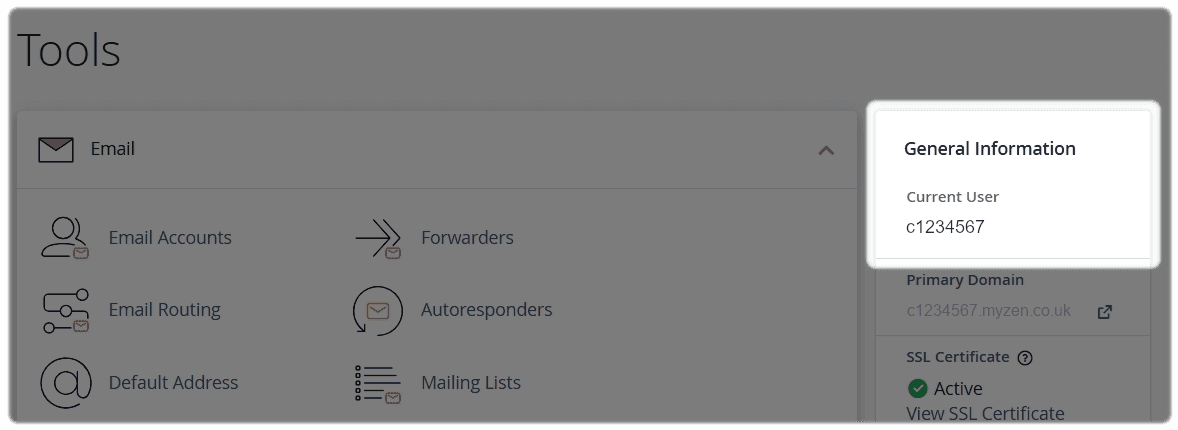
Here you’ll find key details about your hosting account, including:
- your cPanel username
- the server your account is hosted on
- your shared IP address
- your home directory
- your last login IP address
- cache status
These details are commonly needed when working with a developer, configuring software, or reviewing account activity.
2. Server Information
For a deeper look at the software powering your hosting account, you can view Server Information directly from cPanel.
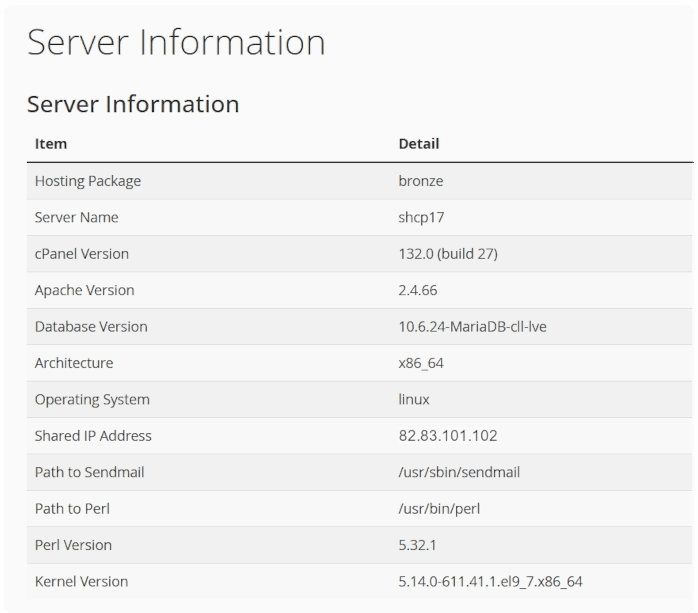
This section shows important version and configuration details, such as:
- your cPanel version
- web server software (e.g. Apache)
- database versions
- paths to key software resources
To access this:
- Go to the General Information panel in cPanel
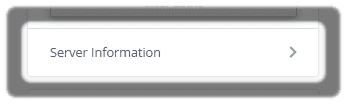
- Select Server Information
- A summary page will open, showing all available server details
This section shows important version and configuration details, such as:
- your cPanel version
- web server software (e.g. Apache)
- database versions
This information is particularly useful for checking whether specific applications, themes, or plugins are supported on your hosting environment
3. Need to Update Your PHP Version?
If you’re reviewing server information because you need to change or confirm your PHP version, we’ve got a step‑by‑step guide to help here.
Need Help?
Feel free to contact our Web Hosting team.
Download the Zen mobile application to manage your broadband plans.


Apple and Apple logo are trademarks of Apple Inc. Google Play and the Google Play logo are trademarks of Google LLC.
