Uninstalling a Domain SSL Certificate on cPanel
1. Accessing SSL/TLS Settings to Uninstall SSL
- First, open your cPanel and log in (for a guide on how to do this look here)
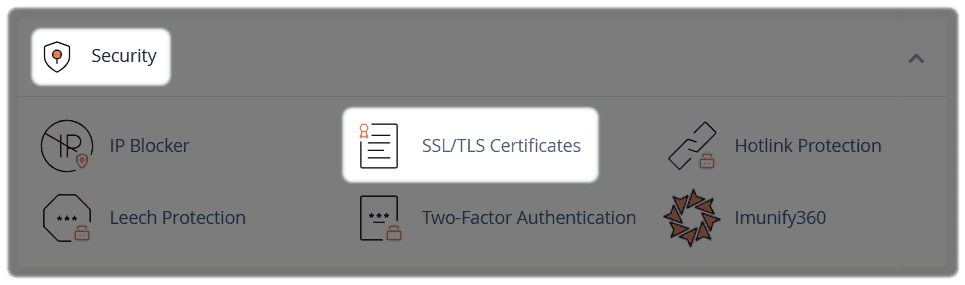
- Select "SSL/TLS" from the "Security" sub-menu
2. Uninstalling SSL Certificates
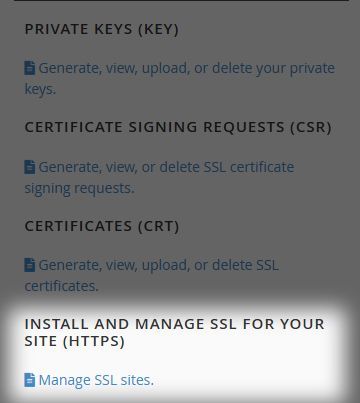
- Within the "SSL/TLS" settings, select the option for "Manage SSL sites" from the right side
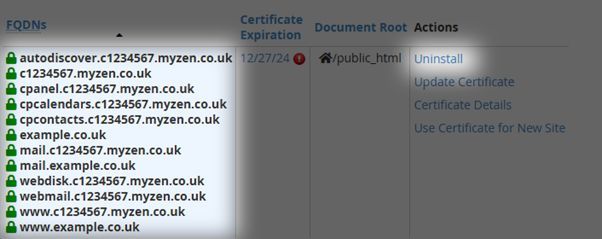
- Now, select the domain name you wish to uninstall the SSL for under the "FQDNs" list, and select "Uninstall" from within the "Actions" heading
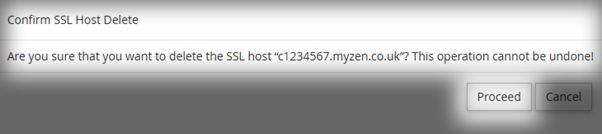
- A confirmation prompt may appear, select proceed to uninstall the SSL certificate on the selected domain
Need to Install an SSL Certifiate?
If you simply want to enable the free Auto-SSL function within cPanel you can find the steps to enable this here.
If you have an SSL Certificate through a Third Party needing to be installed. We'd recommend to reach out to your provider for installation instructions.
Download the Zen mobile application to manage your broadband plans.


Apple and Apple logo are trademarks of Apple Inc. Google Play and the Google Play logo are trademarks of Google LLC.
