How to Enable Guest Access on your eero
1. Locating Guest WiFi Settings in the eero APP
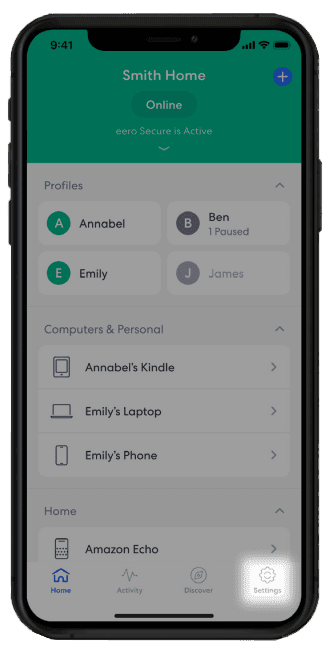
- Open the eero app on your mobile device, then select "Settings" at the bottom of the screen
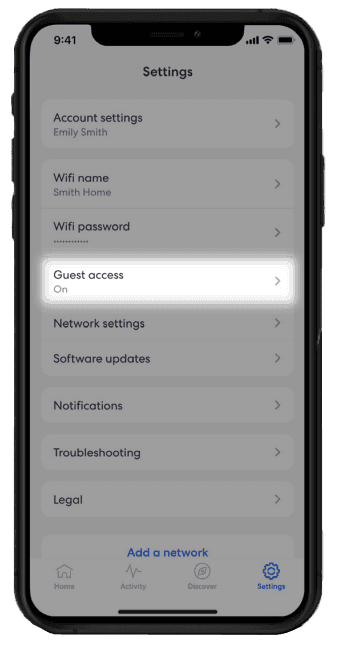
- Now select "Guest access"
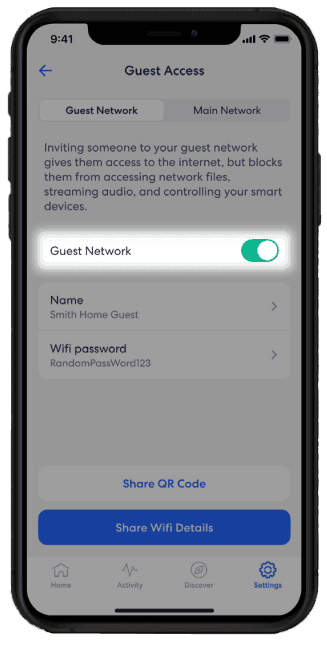
2. Enable Guest Network
To enable the "Guest Network" toggle the switch to green this will allow users to connect using the "Name" and "WiFi Password" shown
Download the Zen mobile application to manage your broadband plans.


Apple and Apple logo are trademarks of Apple Inc. Google Play and the Google Play logo are trademarks of Google LLC.
