Finding your Domain Webspace Details
Need to go bacK?
This guide is part 2 of a step-by-step series to help our customers migrate their webspace content from our website.
If you've found this page by mistake or wish to go back to the beginning, click here!
Getting your Domain Webspace Details
- You should already be on the "Select a Service" page from the previous guide, select your domain service that shows.
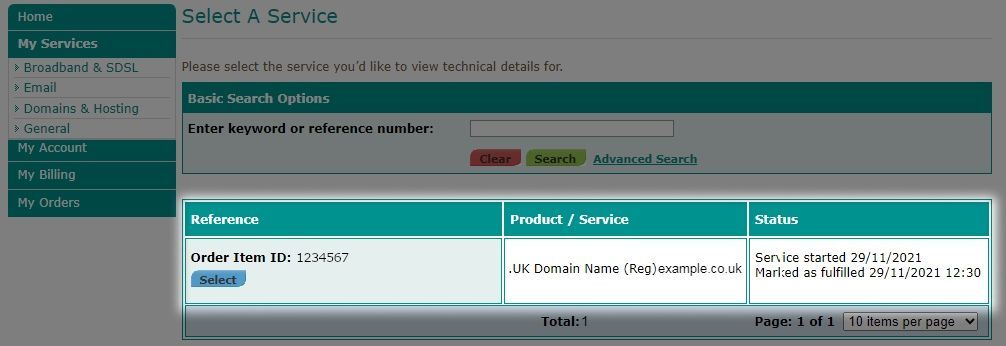
if you don't see this page, click here to go back to the steps that get you there. - Look for the "Domain Registration Technical Details" area
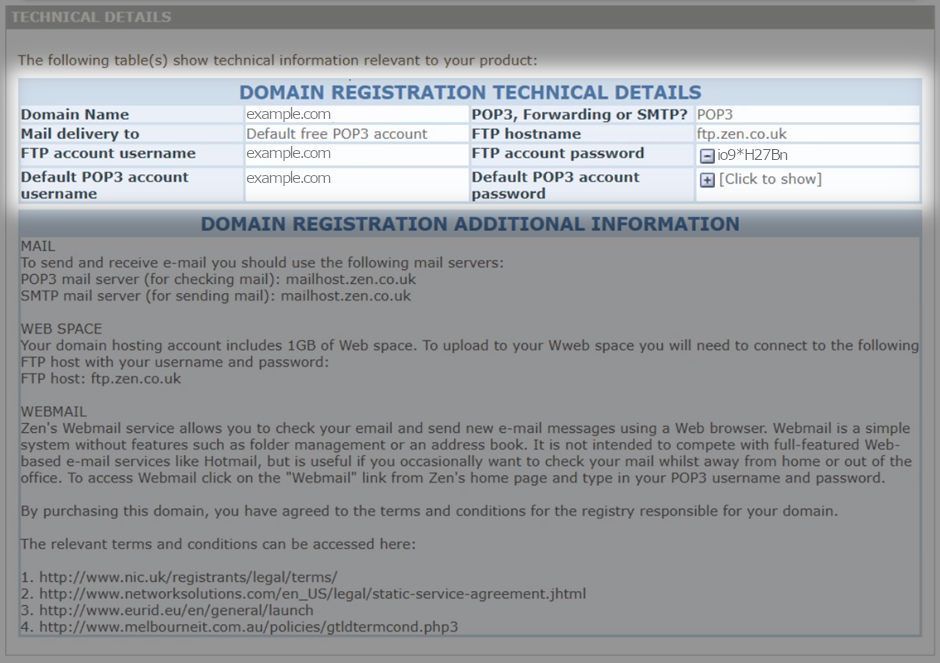
- You should see an FTP "hostname", "account username" and "account password", please take a note of this information

Downloading your Webspace Content
Now you have your Webspace details from the above steps, you'll now need to download the content from this. Click here for the steps needed to do this.
Download the Zen mobile application to manage your broadband plans.


Apple and Apple logo are trademarks of Apple Inc. Google Play and the Google Play logo are trademarks of Google LLC.
